Protect The Front And Backends Of Your Sites

The Only WordPress Plugin Built Entirely Around Protecting Unwanted Access With Coordinated Layers Protecting Every Account That Can Breach Your WordPress Sites

Easy Install • Quick Activation • Your Protected

IMPORTANT:  You Can Protect Your Site Today Absolutely FREE For 30 Days And Have Your SITE Locked Down In Moments

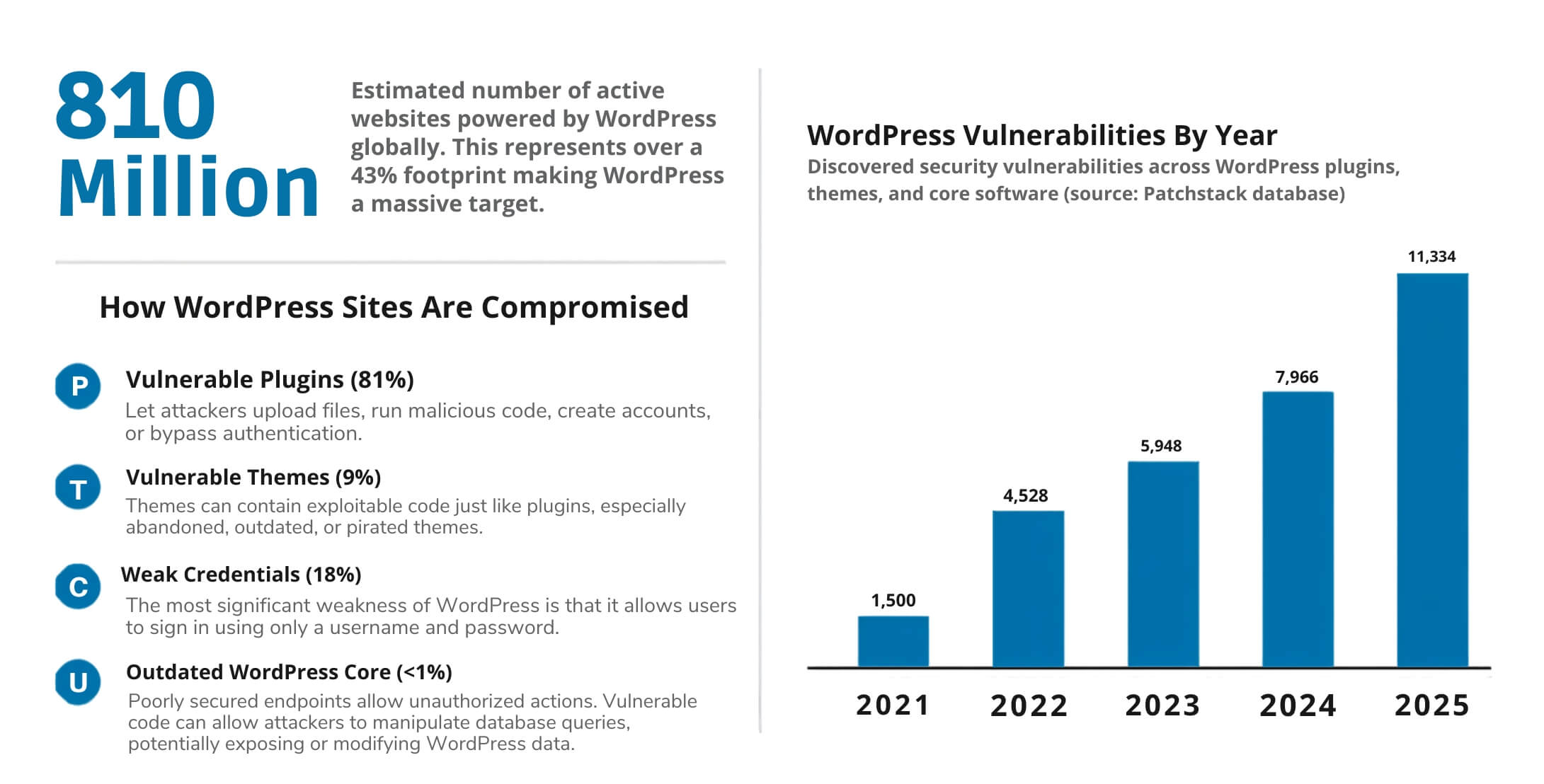
Let's Face The Facts... There Are Over 800 Million WordPress Users

each year, tens of millions of WordPress sites are hacked and taken over, leaving website owners scrambling to restore their sites and regain control

Isn't It Time YOU Took Back Control Of Your Website And Protected What You've Built?

If you had asked me a few years ago what the biggest threats to a WordPress website would be, I probably would have said outdated plugins, weak passwords, or poor hosting.

What I would not have predicted was how aggressive, automated, and persistent website attacks would become.

Today, a hacker does not necessarily need to discover your password. A vulnerable plugin, a compromised account, an unauthorized creation of an administrator, or a hidden backdoor can be enough to give someone access to your WordPress backend.

That is exactly why we spent the better part of 6 months creating WP Perimeter: to put another layer of protection around the most important part of your website and help you stay in control of who gets access.

Here's A Small List Of How WordPress Is Compromised...

  • Stolen or weak login credentials
  • Unauthorized administrator accounts
  • Privilege escalation
  • Malicious file uploads
  • Outdated WordPress core
  • SQL injection
  • Exposed REST API or AJAX functionality
  • Outdated WordPress core
  • Pirated or "nulled" plugins and themes
  • The list goes on....

There Has Been A MAJOR SHIFT  In How WordPress Websites Are Attacked

Millions Of People Didn't Realized They Were Unprotected Till It Was Too Late

attacks on websites are increasing each year. Preventing them is becoming increasingly difficult So Something Has To Change

Most Security Plugins Watch The Front Door... WP Perimeter Guards All Doors

The front end of your site is not where the real damage happens. It happens the moment someone signs in -- who isn't you. Compromised credentials, a stolen editor account, a rogue user quietly created by a vulnerable plugin. any one of them hands an attacker the keys.

With WP Perimeter, every privileged login is verified, monitored, and time-limited so a leaked password on its own is no longer enough to get anybody in. Administrators, Editors, Authors, Contributors, If the account can reach Admin Status, WP Perimeter is standing in front of it.

And here's the part most plugins skip: protection doesn't stop at the login form. WP Perimeter keeps working after sign-in, watching your core files, your critical settings, and your privileged accounts for changes nobody authorized. Security isn't a one-time check, and Your Site Stays Watched Long After The Login Screen Not Just At The Door.

Protected Logins

Every account that can reach wp-admin beyond its own profile is covered—Administrators, Editors, Authors, Contributors, and any custom privileged role. No account gets a quiet exception.

Email One-Time Codes

A correct password isn't enough. Protected logins also require an alphanumeric one-time code delivered by email, so a stolen credential on its own gets an attacker exactly nowhere.

Sliding Sessions

Sessions expire on inactivity rather than living forever. An abandoned laptop, a shared machine, or a forgotten browser tab stops being an open door into your admin area.

Brute-Force Lockout

Repeated failed attempts trigger an automatic lockout. Password-guessing and credential-stuffing runs are cut off long before they have time to find anything.

REST API Hardening

The WordPress REST API exposes more than most site owners realize. WP Perimeter tightens what it will answer, closing off a route attackers use to enumerate users and probe your site.

Integrity Monitoring

Core files, critical configuration options, and privileged user accounts are monitored continuously, so unauthorized changes surface quickly instead of sitting undiscovered for months.

Nothing Comes Close to the Protection WP Perimeter Delivers

WP Perimeter Is Your Best Defense Against Hackers. It's PURPOSE-BUILT for backend access, Enforces VERIFIED Logins and Expiring Sessions, and Adds Continuous Monitoring After Sign-In That Most Plugins Never Attempt

It's Like Having A Personal Security Guard Watching Your Site 24/7, Checking Credentials And Watching For Changes Even When You Are Not There

Layered Defense

One-Time Codes Access For Any Logins

Sliding Sessions

Brute-Force Lockout

REST API Hardening

Integrity Monitoring Emailed Alerts

Monthly

Powerful WordPress protection with flexible monthly billing.
$ 9.95 / month
1 WordPress website
Adds another barrier even if someone gets your WordPress password.

Your Protection Includes
  • Helps keep hackers out of your WordPress dashboard
  • Adds a secure one-time code before access is granted
  • Helps stop stolen passwords from being used
  • Blocks repeated attempts to break into your website
  • Helps prevent unauthorized admin accounts and access
  • Monitors your website for suspicious changes and activity
Protect My Website

5-Site License

Protect up to five WordPress websites with one license.
$ 199 / year
5 WordPress websites • $39.80 per site
Protect up to five WordPress websites with one license.

Protection For 5 Websites
  • Protect up to 5 WordPress websites
  • Helps keep hackers out of every protected dashboard
  • Adds a secure one-time code before access is granted
  • Helps stop stolen passwords and break-in attempts
  • Helps prevent unauthorized admin accounts and access
  • Monitors your websites for suspicious changes and activity
Protect 5 Websites

Try WP Perimeter for 30 days—completely risk-free.

We want you to be completely satisfied. Give WP Perimeter a try for 30 days, and if it does not live up to everything we promised, or if you simply decide it is not right for you, let us know within The First 30-Days. We will gladly refund your full license fee.

See Details Below In FAQ

Frequently Asked Questions

What problem does WP Perimeter actually solve?

Most WordPress security tools work on the assumption that the attacker is still outside — they filter requests, block bad IPs, and scan for malware. WP Perimeter does protect you from that but also from the opposite assumption: that someone may already have a working password, or may have created an administrator account you do not know about.

That happens more often than people expect. Passwords leak in breaches elsewhere and get reused. Phishing works. Vulnerabilities in plugins allow accounts to be created directly in the database, where no security plugin can see them being made.

WP Perimeter makes that access worthless. An administrator password on its own no longer gets anyone in — a one-time code is emailed to that account's own address, and only that code completes the login. If an account gains administrator rights by any route at all, including a direct database write, you are told within minutes. If they don't have a code, they are not granted access.

What it protects and how... 

  • Administrator logins: A password alone is not enough. A one-time code, emailed to that account, is also required
  • Account creation: Privileged accounts cannot be created, and existing accounts cannot be promoted
  • Existing accounts: Password resets and email changes on privileged accounts are blocked or reported
  • The REST API: The endpoints used in automated attacks are refused to anonymous callers
  • Your files: Core files are verified daily against official checksums; new or modified PHP files are reported
  • Your settings: Changes to the site address, admin email and registration settings raise an alert

How does the plugin protection your site?

Most security plugins are built to keep attackers out. WP Perimeter does the same but also assumes one may already be in, and makes an administrator password insufficient on its own.

When an administrator signs in with the correct password, the login is held and a one-time code is emailed to that account. Only the code completes it. Everyone else — customers, subscribers, ordinary users — logs in exactly as before and never sees any of this.

Behind that, the plugin watches for what an intruder actually does while trying to get in and if they are already inside. It blocks new administrator accounts from being created and existing users from being promoted, and reports them if they appear anyway — including accounts inserted straight into the database. It alerts you when your site address or admin email changes, when core files no longer match the official originals, and when a PHP file turns up somewhere it shouldn't. Repeated wrong codes get an address blocked, for longer each time it happens.

Everything is recorded, and anything that matters is emailed (or SMS) to you quickly.

It is deliberately hard to lock yourself out with. It arrives switched off and refuses to switch on until you have confirmed a test email actually arrived, because if email can't reach you, neither can your unlock codes. A six-word emergency recovery phrase, written down when you set it up, gets you in if email later fails. Deactivating or deleting the plugin always restores normal WordPress login — no roles, passwords or permissions are ever altered, so there is nothing to repair afterwards.

How does it stop unauthorized administrator accounts

This is done in three layers, because no single one covers every route in.

It blocks creation. Any attempt to create an account with administrator-level capabilities, or to promote an existing account to one, is refused while the site is locked. This covers the admin screens, the REST API, and code running inside other plugins.

It watches for accounts that appear anyway. Some attacks write directly to the database, where no plugin can intervene — a SQL injection in a vulnerable plugin, for instance. WP Perimeter keeps a record of which accounts are supposed to hold privilege, and compares it against reality every few minutes. An account that appears without going through a normal route is reported within minutes.

It makes the account useless if it does appear. A forged administrator still has to log in, and login requires a code sent to an email address the attacker does not control.

That third layer is the one that matters most. Blocking and detection can both be evaded; requiring possession of a mailbox cannot be, from outside.

What is REST API and how does WP Perimeter protect it?

The REST API is how modern WordPress talks to itself, and it is also where a great deal of automated attack traffic goes.

Anonymous batch requests are refused. The batch endpoint bundles several API calls into one request. It exists for the block editor, and no logged-out visitor ever needs it — but it has been the delivery route for serious WordPress vulnerabilities. Every version is blocked, including batch requests smuggled inside the body of another request, and encoded variants that try to slip past pattern matching.

User modification is blocked. Creating, editing or deleting users over the API is refused while locked.

Plugin and theme changes are blocked. Installing or modifying either over the API is refused. Reading is allowed, because the block editor needs it.

Logged-in access is configurable. By default the batch endpoint is available to content editors and above, so the block editor keeps working normally. You can tighten this to administrators only, or loosen it to any logged-in user.

How does it recognize an attack?

Blocked requests are examined for three kinds of fingerprint:

Known tools. Published exploitation and scanning tools identify themselves in their requests — wp2shell, sqlmap, Nikto, Nuclei, WPScan and others. A request from one of these is not a curious crawler.

Attack-shaped payloads. Certain request structures only occur in exploits: batch requests nested inside batch requests, path-smuggling markers, malformed routing.

Injection patterns. Fragments like UNION SELECT, SLEEP(, INTO OUTFILE and information_schema in a request are not ordinary traffic.

A match is treated as an incident rather than routine noise: it is always alerted on, recorded in full forensic detail, and counted. After two attempts (configurable), that address is refused entirely for a period — not just on the API, but on every request to the site.

Ordinary crawlers never trigger this, and logged-in users are never blocked by it.

What does it watch on my files and settings?

Core files, daily. Every file in wp-admin, wp-includes and the root is compared against the official checksums WordPress.org publishes for your exact version. A modified core file is one of the clearest signs of compromise, and it will not look like malware to a scanner.

New and changed PHP files in your plugins, themes, mu-plugins and uploads directories. Any PHP file appearing in uploads is flagged on sight — that folder is for media, and a script there is almost never legitimate.

Critical settings. Changes to your site address, home URL, admin email, whether registration is open, and the default role for new users. Attackers change these quietly, and nobody notices for months.

Checks run once a day automatically, and again a minute after you install or update a plugin, switch theme, or update WordPress. If a scan has not run for 36 hours, the plugin tells you — usually meaning WordPress scheduled tasks have stopped firing, which is worth knowing in itself.

What does it check about my server?

Outdated WordPress core files, plugins, and themes are among the most common vulnerabilities that can be exploited by external attackers. Therefore, it is essential to keep all components up to date to maintain security.

We run thirteen read-only checks daily:

WordPress version, and whether it is current
Whether automatic security updates are actually working
PHP version, and whether it still receives security patches
Whether PHP can write to your plugins and themes folders
Whether PHP files execute in your uploads folder — tested live, by placing a harmless file and fetching it
Configuration backups, .env files, repository data and debug logs readable over the web
Whether folder contents can be listed in a browser
Whether PHP errors are shown to visitors
Whether the built-in file editor is enabled
Whether public registration is open, and what role new accounts get
HTTPS
Whether author links give away real usernames

Where a fix requires your hosting provider, the plugin supplies wording you can copy and send them. That is deliberate: most of these are things a host will change when asked, and the barrier has always been not knowing what to ask for.

How does the 30-day money-back guarantee work?

If you’re new to WP Perimeter, we recommend starting with a single-license membership first.

Our 30-day money-back guarantee applies for first-time users and only to a single-site license. This gives you the opportunity to try WP Perimeter without risk and determine whether it meets your needs. WP Perimeter multi-site licenses are nonrefundable.

If you're a first-time WP Perimeter customer buying a single-site license, you have 30 days from your purchase date to decide. If it isn't right for you, ask us to cancel within those 30 days and we'll refund what you paid for that license.

Two things to know:

It's for first-time customers and single-site licenses. Multi-license subscriptions aren't covered by this guarantee, and requests for refund made after 30 days can't be honored.

Renewals are treated separately, and more generously. If your license renews when you meant to cancel, tell us within 30 days of the renewal date and we'll cancel it and refund the renewal charge in full. That grace period applies to multi-license subscriptions too — so an automatic renewal is refundable even where the original purchase wasn't.

Your Website. Your Business. Your Control. Protect It With WP Perimeter

Don’t Wait Until You’re Locked Out Of Your Own Website. Secure Your WordPress Site Before It Happens. Take Back Control Of Your Site And Put A Perimeter Around What Matters Most And Keep Unwanted Guests Out

Protect Your Website Before You Have To Recover It.

WP Perimeter focuses on the most dangerous places attackers Try To Hack You

When it comes to WordPress security, the best time to strengthen your defenses is not after you discover the damage... It is before the attacker gets in

© 2026 WP Perimeter by Wumbo   :::   Terms of Service  :::  Privacy Policy